

Master Claude AI prompting to get better results, save time, and unlock the full power of the tool
Quick Answer (TL;DR)
How do you prompt Claude.ai effectively? Structure your prompts using five components – Role, Task, Context, Format, and Constraints. Manage your token usage carefully to avoid hitting context window limits. Use the ready-to-use scripts in this guide for content writing, email drafting, summarising, and more. Most people use only 20% of Claude’s capability and this guide aims to close that gap.
Reading time: 7 minutes
Most people open Claude.ai, type a quick question, read the response, and think: “It’s okay, I guess.” Then they move on, never realising they left 80% of the value sitting on the table.
Claude.ai is not a search engine. It is not Google. It is a reasoning system — one that responds to the quality of your thinking, not just the words you type. The better structured your input, the more useful, accurate, and creative the output. This guide is about closing that gap.
You will learn how to write Claude AI prompts that actually work, how to avoid wasting your token allowance, and walk away with a set of plug-and-play prompt scripts you can use today.
What Is a Token — and Why Should You Care?
Before the tips, a quick concept that will change how you use Claude.
Claude does not read sentences the way you do. It processes tokens — small units of text, roughly 3–4 characters each. The word “marketing” is one token. The phrase “I would like you to” is five tokens you could often replace with a single word.
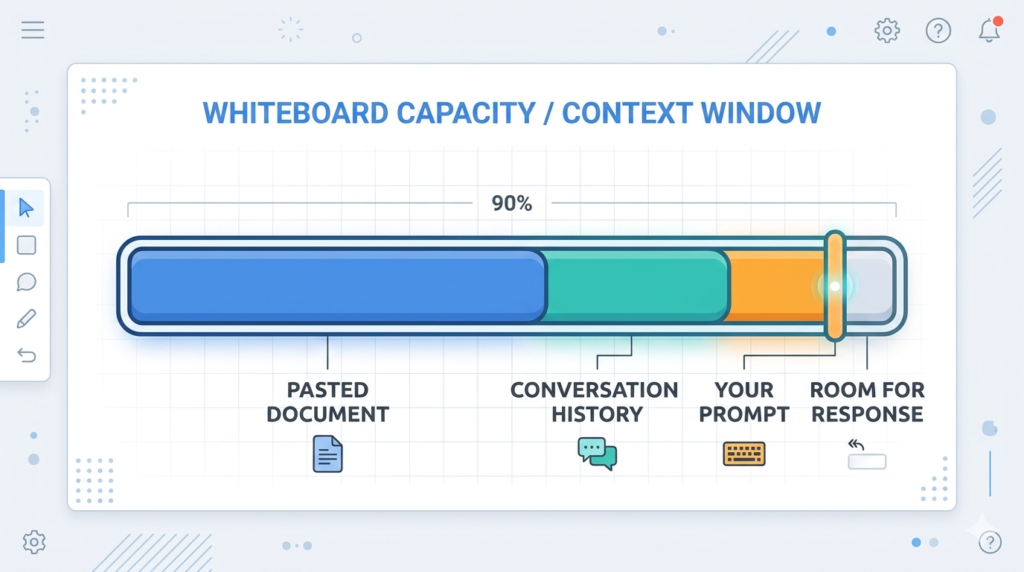
Every conversation has a context window — a cap on how many tokens Claude can hold in memory at once. Think of it like a whiteboard. The more you paste onto it (documents, long histories, repeated instructions), the less room there is for the actual work.
Why this matters practically: If you paste a 4,000-word document into Claude and then ask five follow-up questions, Claude may start forgetting what you said at the beginning of the conversation. Managing tokens means managing Claude’s attention — and, if you are on a paid plan, your allowance.
This is one of the most overlooked aspects of Claude AI tips and tricks: it is not just about what you ask, but how efficiently you ask it.
The 5-Part Anatomy of a Perfect Claude AI Prompt
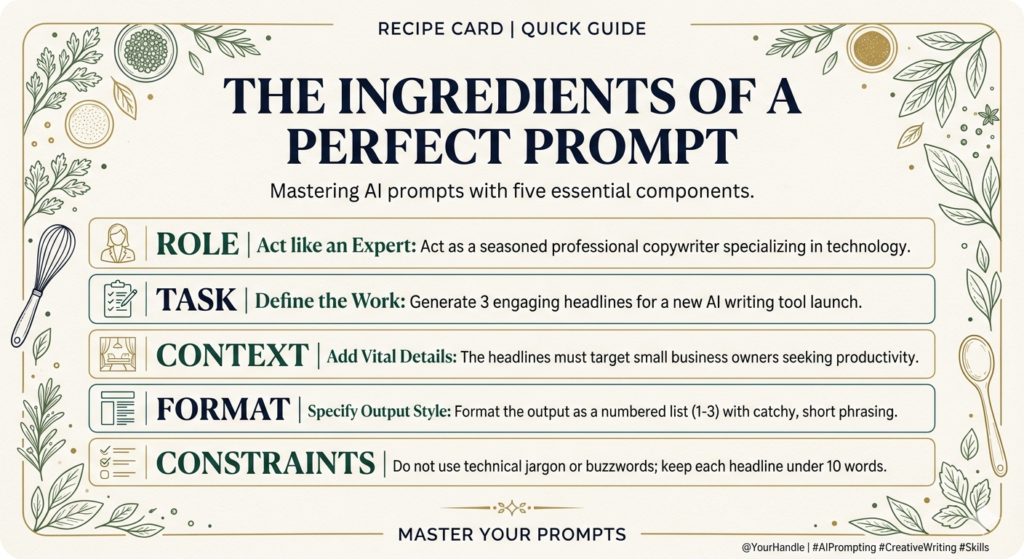
Every high-quality Claude prompt shares the same structure. You do not need all five parts every time, but knowing them helps you choose what to include. Think of this as your Claude AI prompt formula.
1. Role
Tell Claude who it should be. “Act as a senior copywriter with 15 years of experience in B2B SaaS.” This frames everything that follows. Claude will adopt the perspective, vocabulary, and priorities of that role — and the quality of the output shifts noticeably as a result.
2. Task
Be specific about what you want done. Vague: “Write something about my product.” Specific: “Write a 250-word product description for my project management app, targeting small business owners who are overwhelmed by complexity.” The verb matters. Summarise, Compare, Rewrite, Analyse, Translate, Simplify — each triggers a different mode of response.
3. Context
Give Claude the background it needs. The more relevant information you provide, the less Claude has to guess. Guessing is where quality drops. If you are asking Claude to write a proposal, tell it who the proposal is for, what the budget is, and what the client cares about most.
4. Format
Tell Claude exactly how you want the output structured. “Give me a numbered list,” “Write this as a table,” “Keep it to three short paragraphs,” “Format this as a professional email.” Without format instructions, Claude will choose — and it may not choose what you had in mind.
5. Constraints
Tell Claude what to avoid. “No jargon,” “Do not use bullet points,” “Avoid sounding salesy,” “Keep it under 150 words.” Constraints are one of the most underused levers in prompting. They act as a quality filter before Claude even writes a word.
7 Token Efficiency Tricks That Save You Time (and Money)
Knowing how to prompt Claude is only half the battle. Knowing how to do it efficiently keeps your context window clean and your results sharp. These are the Claude AI tips that most guides skip entirely.
1. Summarise before you paste. Never paste an entire article or document if you only need part of it. Read it yourself, pull out the 3–5 key points, and give Claude those. You save hundreds of tokens and get a more focused response.
2. Start a fresh conversation for unrelated tasks. Every message in a conversation adds to the token count. If you have finished one task and are starting something completely different, open a new chat. Do not drag 20 messages of irrelevant history into a new question.
3. Ask for shorter outputs when you do not need long ones. Add “Be concise — under 200 words” or “Give me a one-paragraph answer” to any prompt where length is not important. This keeps responses tight and leaves room for follow-ups.
4. Use bullet-point context instead of paragraphs. When giving background information, tight bullet points cost fewer tokens than flowing prose — and Claude reads them just as well. Compare:
Paragraph version (more tokens): “My company is a small digital marketing agency based in Toronto. We have been in business for six years and work mostly with e-commerce brands in the fashion and beauty space. Our team is eight people and we are currently trying to grow our LinkedIn presence.”
Bullet version (fewer tokens, same information):
- Small digital marketing agency, Toronto
- 6 years in business
- Clients: e-commerce brands, fashion and beauty
- 8-person team
- Goal: grow LinkedIn presence
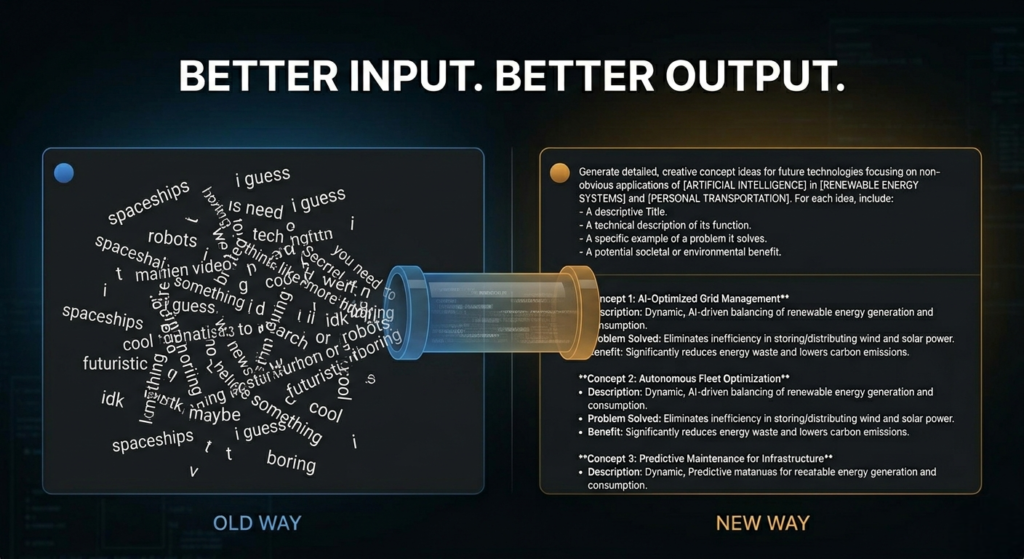
5. Chain your prompts — do not try to do everything at once. Ask for an outline first. Review it. Then ask for the full piece section by section. Each step is focused and efficient. You also catch problems early before Claude writes 800 words in the wrong direction.
6. Refer back rather than repeat. Instead of re-explaining everything in each message, use phrases like “using the context you already have” or “based on the outline above.” Claude holds the conversation in memory — let it.
7. Use Projects for ongoing work. Claude.ai’s Projects feature lets you store persistent context — your business details, writing style, preferences — so you never have to repeat it in every prompt. This alone can save dozens of tokens per session and is one of the most underused features of the platform.
per session.
7 Ready-to-Use Claude AI Prompt Scripts (Copy and Go)
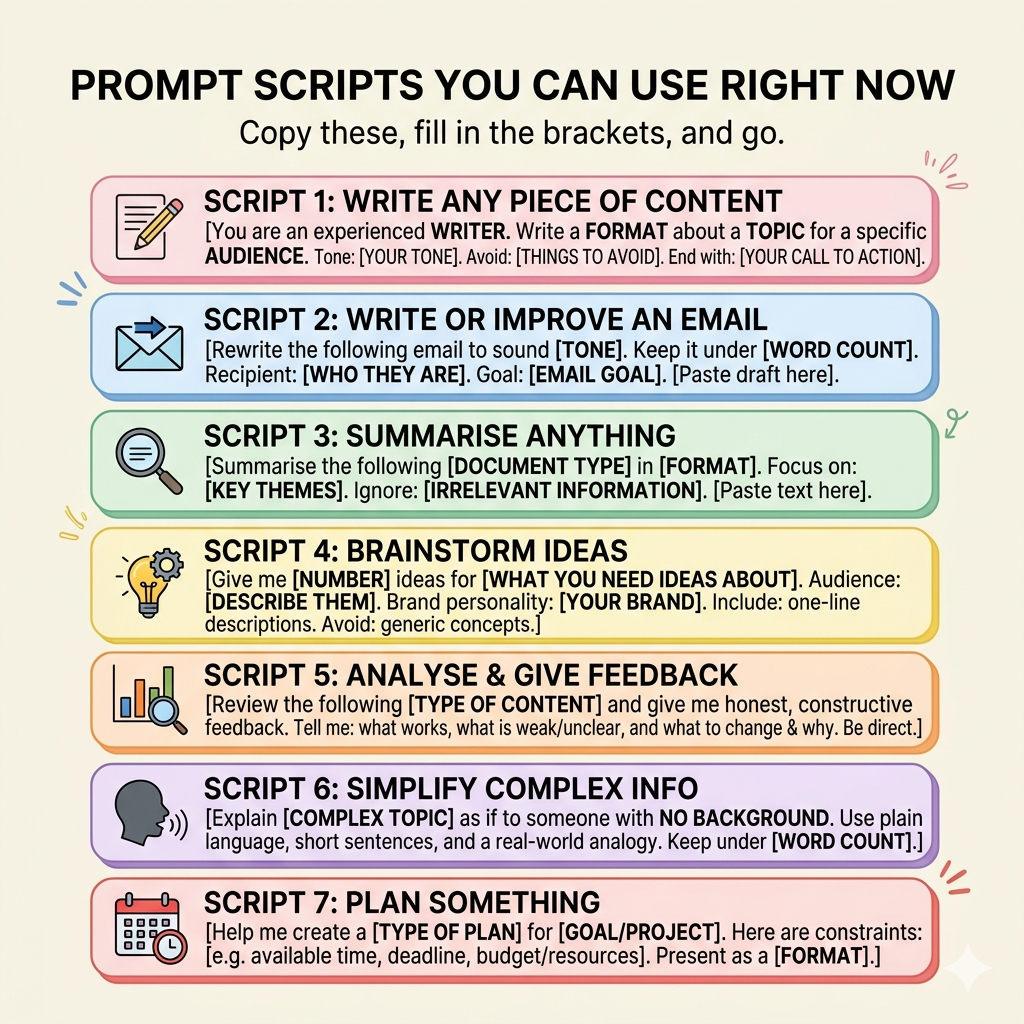
The fastest way to get better results is to stop writing prompts from scratch. Copy these, fill in the brackets, and go.
Script 1: Write Any Piece of Content
You are an experienced [type of writer e.g. copywriter / journalist / blogger]. Write a [format — e.g. 400-word blog post / LinkedIn caption / product description] about [topic]. The audience is [describe your reader e.g. small business owners / first-time homebuyers / HR managers]. Tone: [e.g. conversational and friendly / professional and authoritative / punchy and direct]. Avoid: [e.g. jargon / clichés / bullet points]. End with: [e.g. a question to encourage comments / a clear call to action].
Script 2: Write or Improve an Email
Rewrite the following email to sound [tone e.g. more professional / warmer / more direct]. Keep it under [word count] words. The recipient is [who they are e.g. a potential client / my manager / a supplier]. The goal of this email is to [e.g. follow up on a proposal / apologise for a delay / confirm a meeting].
[Paste your draft email here]
Script 3: Summarise Anything
Summarise the following [document type e.g. article / report / meeting transcript] in [format — e.g. 5 bullet points / 3 short paragraphs / one executive summary]. Focus especially on: [key themes or questions you care about]. Ignore anything related to: [what is not relevant].
[Paste your text here]
Script 4: Brainstorm Ideas
Give me [number] ideas for [what you need ideas about e.g. blog post topics / product names / ways to market my service]. My audience is [describe them]. My brand personality is [e.g. bold and playful / understated and premium / warm and community-focused]. Each idea should include a one-line description of the concept. Avoid anything too generic or obvious.
Script 5: Analyse and Give Feedback
Review the following [type of content e.g. website homepage copy / business proposal / job description] and give me honest, constructive feedback. Tell me specifically: what is working well, what is unclear or weak, and what you would change and why. Be direct — I want useful critique, not flattery.
[Paste your content here]
Script 6: Simplify Complex Information
Explain [complex topic] as if you are speaking to someone who has no background in [relevant field]. Use plain language, short sentences, and a real-world analogy if it helps. Keep your answer under [word count] words.
Script 7: Plan Something
Help me create a [type of plan e.g. 30-day content calendar / project timeline / weekly schedule] for [goal or project]. Here are the constraints:
- [e.g. I have 3 hours per week available]
- [e.g. The deadline is the end of June]
- [e.g. I am working alone with no budget]
Present the plan as a [format e.g. table / numbered list by week].
How Claude Compares to Other AI Tools for Prompting
One question that comes up often: should I be prompting Claude differently than ChatGPT?
The short answer is: the fundamentals are the same (Role, Task, Context, Format, Constraints work for both), but Claude tends to reward more context and nuance. It is particularly strong at long-form reasoning, document analysis, and maintaining a consistent voice across a lengthy piece of work. If you are already using ChatGPT, the principles in this guide transfer directly and you can explore a detailed comparison in the guide to prompting ChatGPT effectively.
If you are thinking about AI more broadly, not just prompting tools but how to build AI into your workflow, it is also worth reading about why small, incremental AI wins often deliver better results than big transformation projects.
The Mindset Shift That Changes Everything
Here is the single most important thing to understand about effective Claude AI prompting: Claude is not reading your mind. It is reading your words.
Every time a result comes back that is not quite right, the most productive question to ask is not “Why did Claude get it wrong?” . It is “What did I not tell it?”
The habit of reviewing your own prompt before you submit it, checking for role, task, context, format, constraints, takes about 30 seconds and will improve your results more than any trick or hack ever will.
Start there. The rest follows naturally.
Common Questions About Prompting Claude AI
Q: What is the best way to prompt Claude.ai? Use the five-part structure: Role, Task, Context, Format, and Constraints. The more specific you are in each area, the better the output. Vague prompts produce generic results; structured prompts produce targeted, high-quality responses.
Q: What is a context window in Claude, and why does it matter? The context window is the total amount of text , measured in tokens, that Claude can hold in memory during a conversation. When you exceed it, Claude starts losing track of earlier parts of your conversation. Managing your token use (shorter inputs, fresh chats for new topics, bullet-point context) keeps Claude focused and your outputs sharp.
Q: Can I use the same prompting techniques for Claude and ChatGPT? Yes — the core principles are the same. Both tools respond well to structured prompts with clear roles, tasks, and constraints. The differences are subtle: Claude tends to handle longer documents and nuanced reasoning particularly well. See the ChatGPT prompting guide for a side-by-side look at both.
Q: What is a token in Claude AI? A token is a small chunk of text, roughly 3–4 characters. Every word, punctuation mark, and space in your conversation consumes tokens. Understanding this helps you write more efficient prompts and avoid hitting context window limits mid-conversation.
Q: How do I save time when prompting Claude for recurring tasks? Use Claude.ai’s Projects feature to store your background information, writing style, and preferences permanently. Then use the prompt scripts in this guide as your starting templates. Both steps together can cut your prompting time by more than half.
Q: Is Claude good for business use? Yes. Particularly for tasks like drafting reports, summarising documents, writing emails, creating content, and analysing data. The key is learning to prompt it well, which is exactly what this guide covers. For a broader perspective on using AI tools in a business setting, see the article on AI implementation strategy and incremental wins.
Have a prompt that works brilliantly for you? Send it through the contact page or leave a comment below. The best ones might just make it into a follow-up post.
Vikram Udyawar is a marketer and strategist with a passion for generative AI. He writes about AI tools, productivity, and practical ways to get more from the technology that is already available to us. Connect with him on LinkedIn.